

Browse Project Memory
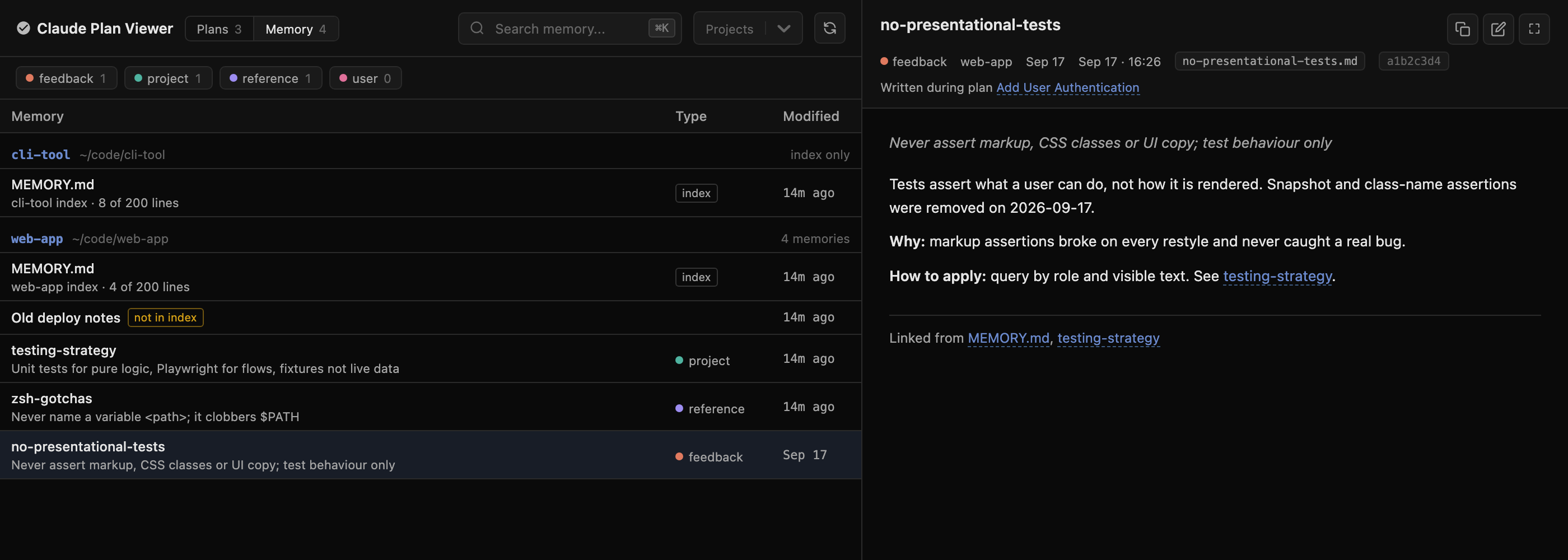
Claude Code's auto memory keeps notes Claude writes for itself: your corrections, preferences, and project context. The Memory view shows them next to your plans.
Switch views with the Plans / Memory tabs in the header, or press 1 and 2.
Where memory comes from
| Location | When it's shown |
|---|---|
~/.claude/projects/<project>/memory/ | Every project directory that has at least one .md file |
autoMemoryDirectory in ~/.claude/settings.json | Shown as All projects |
autoMemoryDirectory in a repo's .claude/settings.json or .claude/settings.local.json | Shown under that project |
When an autoMemoryDirectory setting applies, the project's default directory is marked not in use: Claude Code no longer reads it, but its files are still on disk.
Project names come from the working directory recorded in each project's session logs. If the logs were cleaned up, the name is rebuilt from the directory name.
The memory list
Memories are grouped by project. Each group lists its MEMORY.md index first, then topic files with the newest first.
- Type badges show the
typefrom each file's frontmatter:feedback,project,reference, oruser. The chips above the list filter by type. - not in index marks topic files that
MEMORY.mddoesn't link to. Claude only reads topic files it finds through the index. - Search matches names, descriptions, project names, and file content.
- The Projects filter is shared with the Plans view.
Reading a memory
The detail panel renders the file without its frontmatter and shows:
- The description, type, project, and modification time
- The session that wrote it. Click the session chip to copy
claude --resume <id> - Written during plan … when a plan was created in that same session
[[wikilinks]]and links to other.mdfiles, which open the linked memory- Linked from: other memories that link here
Press Enter to open the file in your editor, or F for fullscreen.
The index load budget
Claude Code loads only the first 200 lines or 25 KB of MEMORY.md at the start of a session, whichever comes first. Selecting a MEMORY.md shows how much of that budget it uses, plus warnings for:
- Topic files the index doesn't link to
- Index links that point to files that don't exist
From a plan to its memory
When a plan's project has memory, the plan's detail panel shows an N memories chip. Click it to open the Memory view filtered to that project.